
Bitcoin Correlation With Stocks: S&P 500 & Nasdaq Data


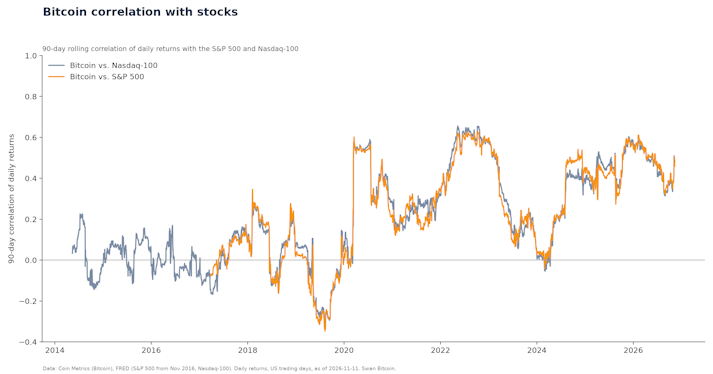
Bitcoin’s correlation with the S&P 500 was 0.42 in 2025 and 0.46 over the last 90 days (Nov 2026). Yearly data since 2017, Nasdaq, dollar and crash days.
In this article
Bitcoin cold storage means keeping the private keys that control your Bitcoin on a device that never connects to the internet, usually a hardware wallet. It is the safest way to hold Bitcoin you plan to keep for years: a hacker who compromises your phone or computer can see your balance but cannot move your coins. This guide covers how cold storage works, the hardware wallets available in November 2026 and what they cost, step-by-step setup, how to move Bitcoin off an exchange, and the mistakes that cost people their coins.
TL; DR: While keeping Bitcoin on exchanges offers some protection, it also carries risks like potential hacks or legal issues, as experienced by Mt. Gox and FTX users.
Bitcoin left on an exchange is an IOU from that company. If the exchange is hacked, freezes withdrawals or goes bankrupt, you wait in line with every other creditor.
Mt. Gox was hacked in 2014. More than a decade later, its trustee is still repaying creditors: in October 2026 the Tokyo District Court approved moving the repayment deadline to October 31, 2027, the sixth extension since 2023 (Cointelegraph).
FTX collapsed in November 2022 and froze customer funds. See the FTX fiasco and the fallout.
Bitcoin is a digital bearer asset, a new form of property that you can hold yourself. Buying on an exchange is fine; leaving large amounts there long term is the risk. Moving it to cold storage puts you in control.
Cold storage is a form of self-custody where your private keys are created and kept offline. Your wallet software on a phone or computer only holds public information, so it can show balances and build transactions, but every transaction must be approved (signed) on the offline device. It works like a physical security key such as a YubiKey: the secret never leaves the device.
Every Bitcoin wallet has two kinds of information:
Public: your addresses (and the extended public key, or XPUB, that generates them). Safe to share; anyone can send Bitcoin to them.
Private: your private keys, backed up as a 12- or 24-word seed phrase. Whoever has these controls the Bitcoin.
Bitaddress.org
A hot wallet keeps its private keys on an internet-connected device, such as a phone app. A cold wallet keeps them offline.
Security: a cold wallet’s keys are never exposed to the internet. A hot wallet’s keys sit on a device that can be hacked or infected with malware.
Convenience: a hot wallet is faster for everyday spending. A cold wallet takes a few extra steps to sign each transaction.
Cost: most hot wallet apps are free. Hardware wallets cost about $149 to $369 (see below).
Best use: hot wallets for small, spending amounts; cold storage for long-term savings.
Many Bitcoiners use both: a small balance in a mobile wallet and their savings in cold storage.
These are popular hardware wallets, with prices from each maker’s own store on November 11, 2026. Prices change often, especially during holiday sales, so check before you buy.
Blockstream Jade Plus: from $149 (reinforced plastic), $169 (metal). Swan Vault uses two Jade Plus devices (below).
Bitkey: $250. A Bitcoin-only, 2-of-3 multisig wallet with no seed phrase: the device, your phone and Bitkey’s server each hold a key.
COLDCARD Mk5: $269 list ($219 on sale on November 11). Improved keyboard, a 1.54-inch Gorilla Glass screen and NFC.
COLDCARD Q: $369 list ($319 on sale on November 11). Adds a QR scanner, a full QWERTY keyboard and a larger screen.
Passport Prime: $349, from Foundation. Open source; also stores 2FA codes and security keys.
For a fuller comparison, including mobile and desktop wallets, see our guide to the best Bitcoin wallets.
Setting up cold storage looks intimidating, but it takes less than an hour. BTC Sessions has a full video library of hardware wallet setups for each device.
Buy directly from the maker. Order from the manufacturer’s own store, not a third-party marketplace, so the device can’t be tampered with before it reaches you. Check the packaging and follow the maker’s instructions for verifying the device.
Power it up and set a PIN. The PIN protects the device if someone steals it. If you forget the PIN, you can still recover your Bitcoin from the seed phrase.
Write down your seed phrase. The device generates 12 or 24 words. They are the master backup of your private keys. Write them on paper or stamp them into a metal backup. Never photograph them, type them into a phone or computer, or store them in a password manager or cloud drive.
Confirm the backup. Most devices ask you to re-enter some or all of the words. Do it carefully.
Connect wallet software as “watch-only.” Export the device’s extended public key (XPUB) into wallet software such as Sparrow (desktop) or BlueWallet (mobile). The software can show your balance and create receive addresses, but it cannot spend without the device.
Test with a small amount. Send a small amount of Bitcoin to your new wallet, then practice a recovery: wipe or reset the device, restore it from your seed phrase, and confirm the same addresses and balance appear. Only then move larger amounts.
In your wallet software, create a new receive address and confirm it on the hardware wallet’s screen. Malware can swap addresses on a computer screen, but not on the device.
In the exchange, choose withdraw (or send), paste the address and check the first and last several characters against the device.
Send a small test amount first and wait for it to arrive.
Send the rest.
Check the exchange’s withdrawal fee first. At Swan, Bitcoin withdrawals are always free, according to its fees page.
A single hardware wallet has one weak point: its seed phrase. Anyone who finds it can take your Bitcoin, and if it’s destroyed, your Bitcoin is gone. Multisig (multi-signature) wallets fix this by requiring several keys to move funds.
Swan Vault uses 2-of-3 multisig. According to Swan’s Vault page (checked November 11, 2026):
You hold two keys in cold storage on two Blockstream Jade Plus signing devices.
You manage the third key, a cloud key, through your Swan account.
Any two keys can move your Bitcoin, so losing one key doesn’t lose your funds. Swan has access to only one key, so it can’t move your Bitcoin without you.
Withdrawals made using the cloud key have a 72-hour security hold.
The Swan Vault Welcome Package costs $319 and includes 2 Jade Plus signing devices and 2 USB-C cables.
Bitkey (above) uses a similar 2-of-3 design. For a broader look at custody choices, see Bitcoin custody without overcomplicating it.
A paper wallet is a private key printed on paper, usually generated on a website such as bitaddress. We don’t recommend them:
Easy to destroy. Fire, water, humidity and time all damage paper.
Risky to create. Generating keys on a computer exposes them to malware.
Hard to use safely. Spending from a paper wallet means importing the key into software, which turns cold storage into a hot wallet.
A hardware wallet with a seed phrase backup does the same job with far less risk. If you already have an old paper wallet, sweep its Bitcoin into a hardware wallet.
Oopsie daisies. This person used a paper wallet and is now poor.
Losing a hardware wallet is not a disaster if your seed phrase backup is safe; you can restore on a new device. Losing the seed phrase is how people lose Bitcoin.
Store the seed phrase and the device in different places. A thief who finds both has everything.
Use fire- and water-resistant backups. A metal seed backup survives a house fire; paper may not.
Don’t split a seed phrase into pieces and give them to different people. Each piece weakens the security of the whole. If you want keys in several places, use multisig instead.
Keep it simple enough to recover. The most elaborate hiding places fail when the owner forgets them or their family can’t find them. Plan for inheritance too: see our guide to Bitcoin estate planning.
Treat it like any valuable bearer asset, such as jewelry or cash. Mounts like those from Crypto Cloaks let you hide a device in plain sight.
Update firmware only from the maker’s official app or website.
Fake support and recall scams. Foundation, the maker of Passport, warns customers that calls and emails claiming a Passport recall or a compromised device are scams. No legitimate company will ever ask for your seed phrase. Anyone who asks for it is trying to steal your Bitcoin. See also is Coinbase safe for how exchange-impersonation phishing works.
Typing the seed phrase into a computer or phone, including “wallet recovery” websites.
Never testing the backup. Practice a restore before you rely on it.
Telling people about your holdings. Bitcoin cold storage rules are like Fight Club: don’t talk about it except with people you completely trust, such as a spouse or next of kin.
On March 14, 2024, El Salvador’s president Nayib Bukele announced the country had moved “a big chunk” of its national Bitcoin to a cold wallet stored “in a physical vault within our national territory.”
If you’re still using an exchange, compare Coinbase alternatives, read is Coinbase in trouble, or learn how to delete your Coinbase account. For retirement savings held in Bitcoin, see the Swan Bitcoin IRA and our comparison of IRA providers that offer Bitcoin. For background on what wallets are protecting, see what Bitcoiners need to know about hashes. And plan your security for the long term, not just today’s balance: for what analysts have forecast, see our roundup of Bitcoin price predictions.
Hold your IRA with the most trusted name in Bitcoin.
Bitcoin cold storage means keeping your private keys on a device that never connects to the internet, usually a hardware wallet. Your Bitcoin stays on the blockchain; the offline device holds the keys that can move it.
Usually. A hardware wallet is the most common type of cold wallet. Paper wallets and air-gapped computers are also cold storage, but they are harder to use safely.
On November 11, 2026, popular hardware wallets cost from $149 (Blockstream Jade Plus, plastic) to $369 (COLDCARD Q list price) on the makers' own stores.
Your Bitcoin is safe as long as you still have your seed phrase. Buy a new device, restore from the seed phrase and move on. If you lose the seed phrase too, the Bitcoin is gone, unless you use multisig.
Create a receive address in your wallet software, confirm it on the hardware wallet’s screen, withdraw from the exchange to that address, and send a small test amount first.
Multisig removes the single point of failure: no single lost or stolen key can lose or steal your Bitcoin. It takes a little more setup, which services such as Swan Vault handle for you.
No. Swan Vault is 2-of-3 multisig and Swan has access to only one key, so it cannot move your Bitcoin without your participation, according to Swan’s Vault page.
Cointelegraph, Mt. Gox extends creditor repayment deadline to 2027 (October 2026)
Blockstream store, Jade Plus (checked November 11, 2026)
Bitkey (checked November 11, 2026)
Coinkite store, COLDCARD (checked November 11, 2026)
Foundation, Passport Prime (checked November 11, 2026)
Nayib Bukele on X, March 14, 2024
Mickey Koss became a freelance writer in the Bitcoin space in an attempt to build a proof of work portfolio for when he left the Army. He graduated from West Point with a degree in Economics before serving in the Army for nearly a decade. He became orange pilled in graduate school and is now a regular contributor to Forbes, Bitcoin Magazine, and Bitcoin News. He’s been on popular podcasts such as BTC Sessions’ Why Are We Bullish, and is a regular on Café Bitcoin.
Drew, a class of 2013 Bitcoiner, is a Research Analyst for Swan Bitcoin.
He has worked in institutional VC/PE, FinTech, and DLT consulting for over six years. He also brings over twelve years of experience working with national nonprofits and start-ups in education and software development in several leadership roles.
In this article
Thoughts on Bitcoin from the Swan team and friends.
Bitcoin’s correlation with the S&P 500 was 0.42 in 2025 and 0.46 over the last 90 days (Nov 2026). Yearly data since 2017, Nasdaq, dollar and crash days.
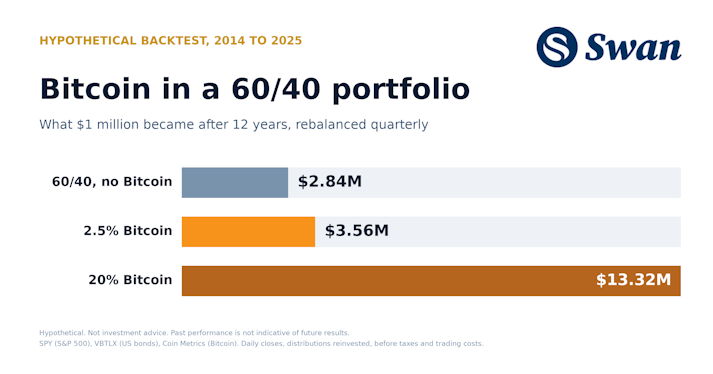
How much Bitcoin to hold in a 60/40 portfolio: 2.5% lifted annual returns from 9.1% to 11.2% (2014–2025). Results from 1% to 20%, drawdowns and method.
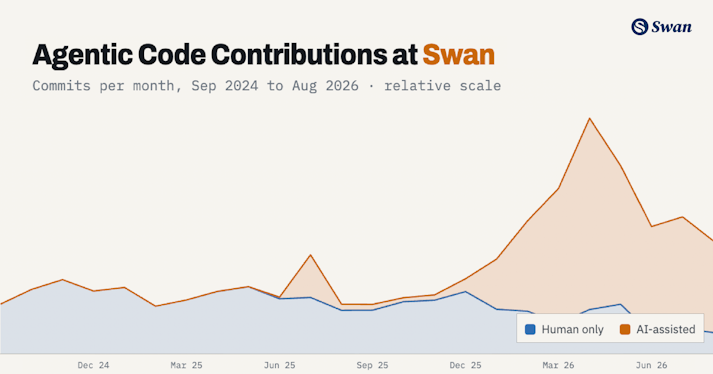
How Swan built an agentic software factory that finds production bugs, reaches consensus on the fix, opens the PR, and proves it works before a human merges.